Configuring Kanzi Studio projects
To configure a Kanzi Studio project:
-
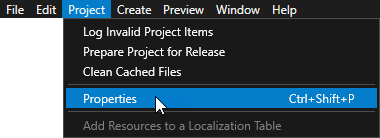
Open the project and in the main menu select > .
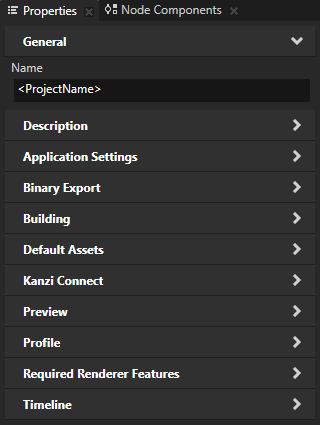
- In the Properties set the properties in these property categories to configure your project:
- Description to document the project. See Documenting a project.
- Application Settings to set:
- Binary Export to configure the contents of the kzb file.
For example, use these properties to optimize the export of meshes and images. - Building to set the application configuration that Kanzi Studio uses to build the project. See Configuring Android builds.
- Default Assets to set which assets you want to use when you create nodes and resources. See Setting the default assets.
- Kanzi Connect to enable the Kanzi Connect tools in the project.
- Preview to configure the Preview to work with Kanzi Engine plugins. See Creating Kanzi Engine plugins.
- Profile to set the name of the kzb file and project descriptions file, and the graphics API. See Using kzb files, Documenting a project, and Using OpenGL ES 3.0 in Kanzi.
- Required Renderer Features to set which features you want the renderer to support.
For example, you can request support for half-float texture format and color attachment. - Timeline to set the start and end times of the global timeline of the project.
To view the timeline, select > Toolbar > .
Setting the default assets
You can set which assets you want to use when you create new nodes and resources.
To set the default assets:
-
Open the project and in the main menu select > .
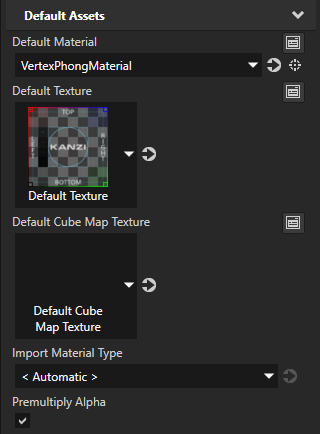
- In the Properties in the Default Assets category set which assets you want to use by default:
- Default Material sets the material that Kanzi Studio sets to models you create and import that do not have a material.
- Default Texture sets the single texture that Kanzi Studio sets to all new Image nodes and materials that use textures.
- Default Cube Map Texture sets the cubemap texture that Kanzi Studio sets to all new materials that use cubemap textures.
- Import Material Type sets the material type to which Kanzi Studio assigns the materials that you import with 3D asset files.
See also
Creating a project
Combining Kanzi Studio projects into a Kanzi application
Importing projects
Merging projects
Cleaning up your project
Documenting a project
Using kzb files
Configuring Android builds
Creating Kanzi Engine plugins
Using OpenGL ES 3.0 in Kanzi
Setting how Kanzi Engine handles unused resources

Open topic with navigation